Let AI agents write your software. Ship only what the compiler has verified.
AIR is a native compiler and application platform. Every function declares what it can touch, every build is checked before code is generated, and applications compile to a native binary with no language runtime or package environment to deploy, plus a build record you can audit.
Proven on large applications built in AIR
- Genesis AIR
- MM-Air
- AIR Lens
- Workbench
- Taskboard
What AIR includes today
- Native apps
- Desktop UI
- PostgreSQL
- HTTPS and TLS
- OAuth2 and OIDC helpers
- LDAP · S3 · Redis
- Vault · OTLP · NATS · SCIM
- JWT and JWKS
- Relationship-based authorization
- GPU compute
- Agent verification
- Native binaries
AI agents made writing code cheap. Trusting it is still expensive.
Your teams already use coding agents. The cost moved from typing to reviewing: what did this change touch, what does it depend on, and what exactly is running in production?
A typical stack today
- Reviewers read everythingWhether a helper touches the network or the filesystem is found by reading its whole call graph.
- Agents guess at APIsModels work from memory and from documentation that drifts from the code.
- Deployments carry a runtimeInterpreters, virtual environments and package trees ship with the application and need patching.
- AI workloads need a separate stackModel inference usually means a Python service with its own dependencies and failure modes.
With AIR
- Capabilities are in the signatureEvery function declares its effects. The compiler rejects any call that reaches beyond them.
- Agents ask the compilerLive schema and capability queries return exact signatures, so agents don't guess.
- Native binariesAIR compiles to C11 and a native executable, with no language runtime or package environment to deploy.
- AI runs in the same programNative GPU model pipelines run in-process, on your hardware, with no Python layer.
Least privilege you can read off the code.
Security review starts with the question "what can this touch?" In AIR, the answer is part of every function's type, and the build fails if the code does more than it says. The matrix on the right is MM-Air's, read straight from its source.
| Function | read files | write files | sockets | processes | GPU |
|---|---|---|---|---|---|
| parameters.decode_qwen_image | |||||
| library.encode_history | |||||
| library.load_history | |||||
| library.save_history | |||||
| main.copy_result | |||||
| main.show_items | |||||
| library.video_thumbnail | |||||
| generate.inspect_h3_lora | |||||
| generate.run_krea | |||||
| prompt_lab.run |
library.encode_history ever wrote a file, the build would stop with AIR-E0402.The compiler answers first. The model reasons second.
AIR gives agents the compiler's own knowledge of your codebase. When the compiler can prove an answer or an exact repair, that answer wins. The model takes over only where no proof exists, so its effort goes to real design questions.
"Does this project have SHA-256?"
Or: which callers break if this signature changes?
Live schema and project index
Exact signatures, effects and source identities, queried at the moment of use.
Exact answer or repair
Machine-applicable fixes are routed through verification before they're applied.
Checked and recorded
Stale answers are blocked, and agent runs leave durable receipts.
- Schema
- Provenance
- Diagnostics
- Exact repair
- Impact
- Verification
- Agent receipt
$ airc capability "Does AIR provide SHA-256?" --json
$ airc project context app.ai --name report_digest --json
# answers are available, unknown, or unavailable only with complete authority
A build record your auditors can read.
Every build can emit a structured report: which sources went in and their digests, which compiler and toolchain produced it, what the optimizer changed, and the hash of what came out.
// excerpt of a real build report
{
  "kind": "build-report",
  "provenance": { "compiler": "airc", "revision": "b9a10d7…" },
  "unit": {
    "module": "site.codec",
    "sources": [ /* 7 files */
      { "path": "codec.ai", "sha256": "26a2856c…" } ]
  },
  "summary": { "errors": 0, "warnings": 0, "unsafe_ops": 0 },
  "plan": { "verified_functions": 57 },
  "toolchain": { "identity": "gcc 15.3.0" },
  "artifact": { "bytes": 133808, "sha256": "a994cffc…" },
  "status": "ok"
}
Enterprise protocols, proven against real products.
AIR applications can speak PostgreSQL, LDAP, S3, Redis, Vault, OpenTelemetry, NATS/JetStream and SCIM natively. These are client modules for established protocols and APIs—not AIR-owned server replacements and not Python SDK wrappers.
The post-merge sequential acceptance run passed 9/9 in 38.34 seconds: the standard-library gate plus eight disposable real-service integrations. Read the retained command, product versions and limits.
PostgreSQL 18.6
Protocol v3 with verified TLS, SCRAM, typed and parameterized results, connection pools, 100,000-row COPY and asynchronous LISTEN/NOTIFY—without libpq.
OpenLDAP 2.6.10
LDAPv3 bind and search, paged users and groups, nested membership, verified StartTLS and LDAPS, typed failures and reconnect.
S3 and MinIO
SigV4 object operations, presigned URLs, Content-MD5, multipart lifecycle and bounded streaming, including a verified 1-GiB upload.
Redis 7.0.15
RESP3, TLS and ACL authentication, CRUD and expiry, pipelines, transactions, pub/sub, connection pools and restart recovery.
HashiCorp Vault 2.1.1
AppRole login, least-privilege policy checks, KV v2 with CAS, renewable and revocable tokens, lease lifecycle and verified HTTPS.
OpenTelemetry Collector
Batched OTLP/HTTP JSON traces, gauge metrics and correlated logs, with resource attributes, CSPRNG IDs and transient-failure retry.
NATS and JetStream
Core pub/sub and request/reply plus persistent streams, durable consumers, acknowledgements, redelivery, deduplication and restart persistence.
SCIM 2.0
Discovery, Users and Groups, PUT/PATCH, ETags, filters and pagination, tested against independent Canaille rather than an AIR mock.
Identity and policy
Verified HTTPS, OAuth2/OIDC helpers, JWT/JWKS verification and relationship-based authorization remain available beside the new service clients.
Measured scope: disposable local products with negative TLS/authentication paths, interruption and reconnect. Real AWS S3, Microsoft Active Directory and hosted SaaS endpoints were not run; SAML 2.0, protobuf/gRPC and SMTP remain later work.
Generative AI on hardware you already own.
AIR runs complete image and video model pipelines as native programs on your GPUs: checkpoint loading, memory-bounded offloading, INT8 attention and media encoding. With AIR's local model pipelines, prompts and outputs stay on your network, and there's no Python service to maintain.
- MiniMax H3Text, keyframe and reference to video, with synchronized audioIn daily use
- Krea 2 TurboText to image, any size from 512 to 2048 pxComplete
- Qwen-Image 2.1Text to image, and editing from up to 10 source imagesComplete
- Z-Image TurboFast text to imageIntegrated
- YuE2Music and song generationIn progress
- LTX-2Video generationIn progress
MiniMax H3 reference-to-video at 832×480, 5 seconds, on one 24 GB RTX 3090 Ti. The whole request took 6 minutes 16 seconds from Generate to finished video, with zero disk reads during sampling.
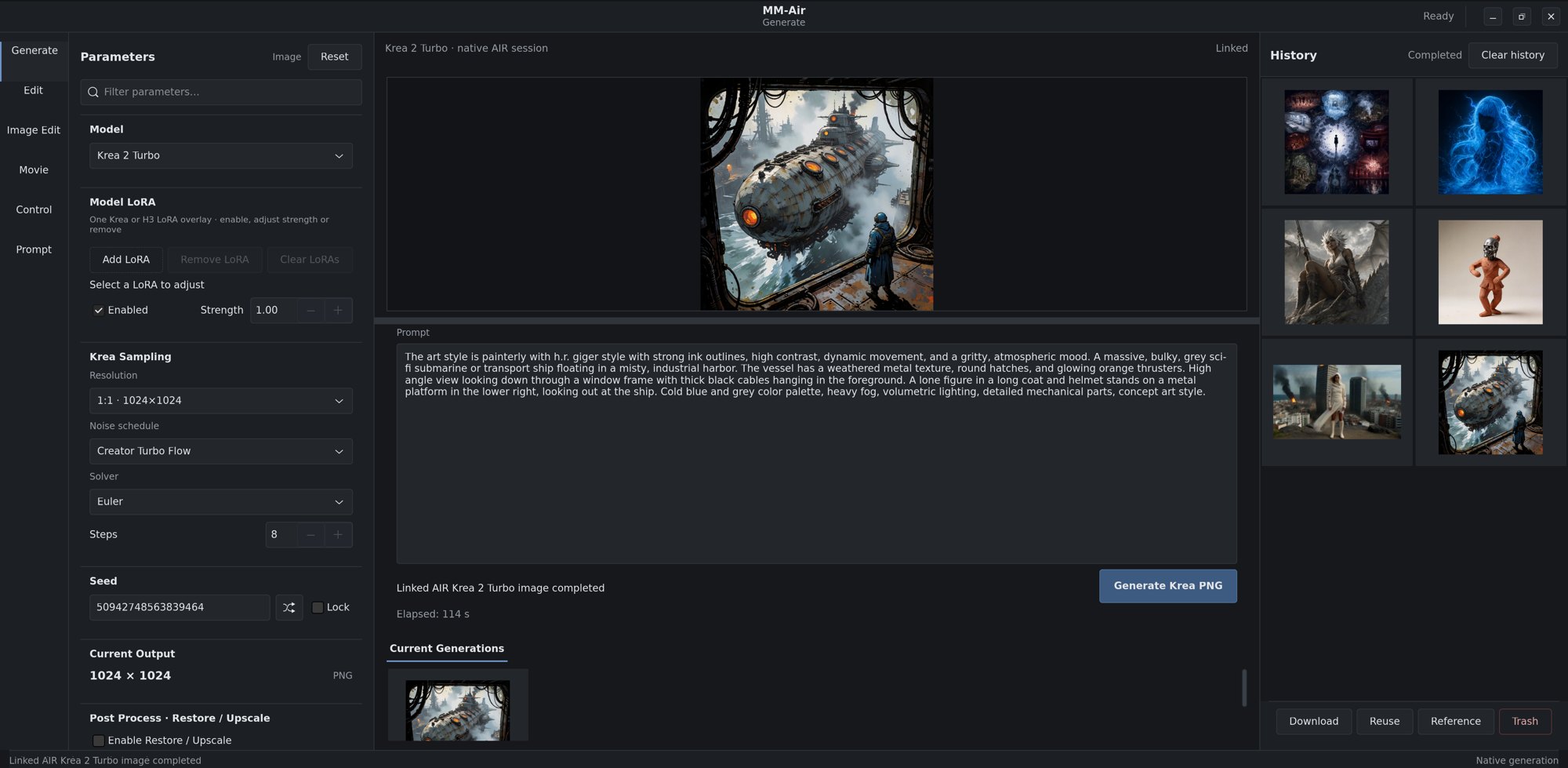
MM-Air: the studio your media team opens.
A native desktop app, written in AIR, that runs these models on a single workstation: generate, edit, direct shots and keep a searchable history. No web service, no Python environment.

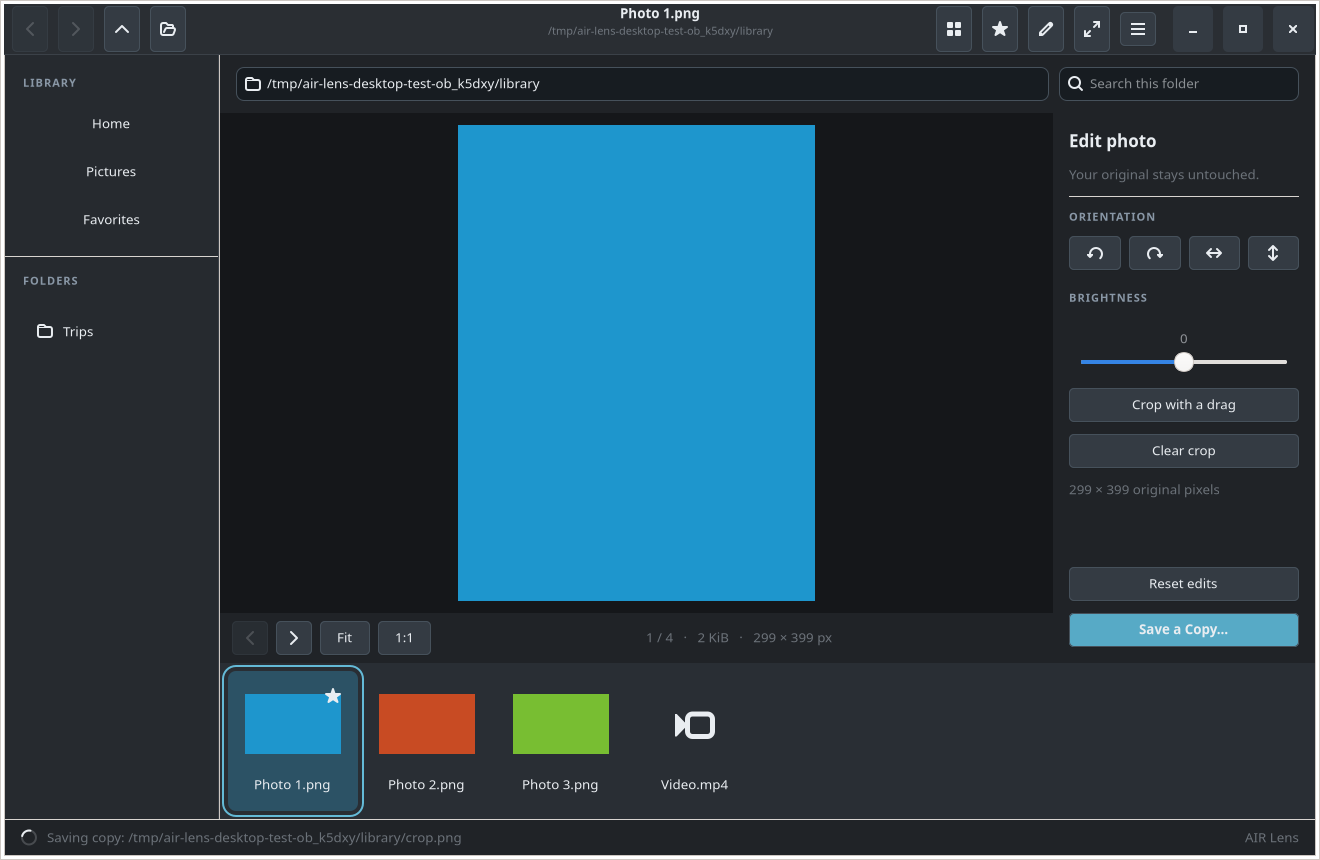
AIR Lens: a native media browser, written in AIR.
A real desktop application with folders, catalogs, saved searches, photo and audio metadata, video playback, image editing, drag and drop, import and Linux desktop integration.
View AIR Lens source, build instructions and acceptance evidence
- The 35-feature gThumb parity batch is complete, with zero rows left marked missing
- Reusable media, metadata, catalog and desktop services live in AIR's standard library and toolkit
- 17 of 17 acceptance cases pass; the real GTK workflow completes in 121.33 seconds
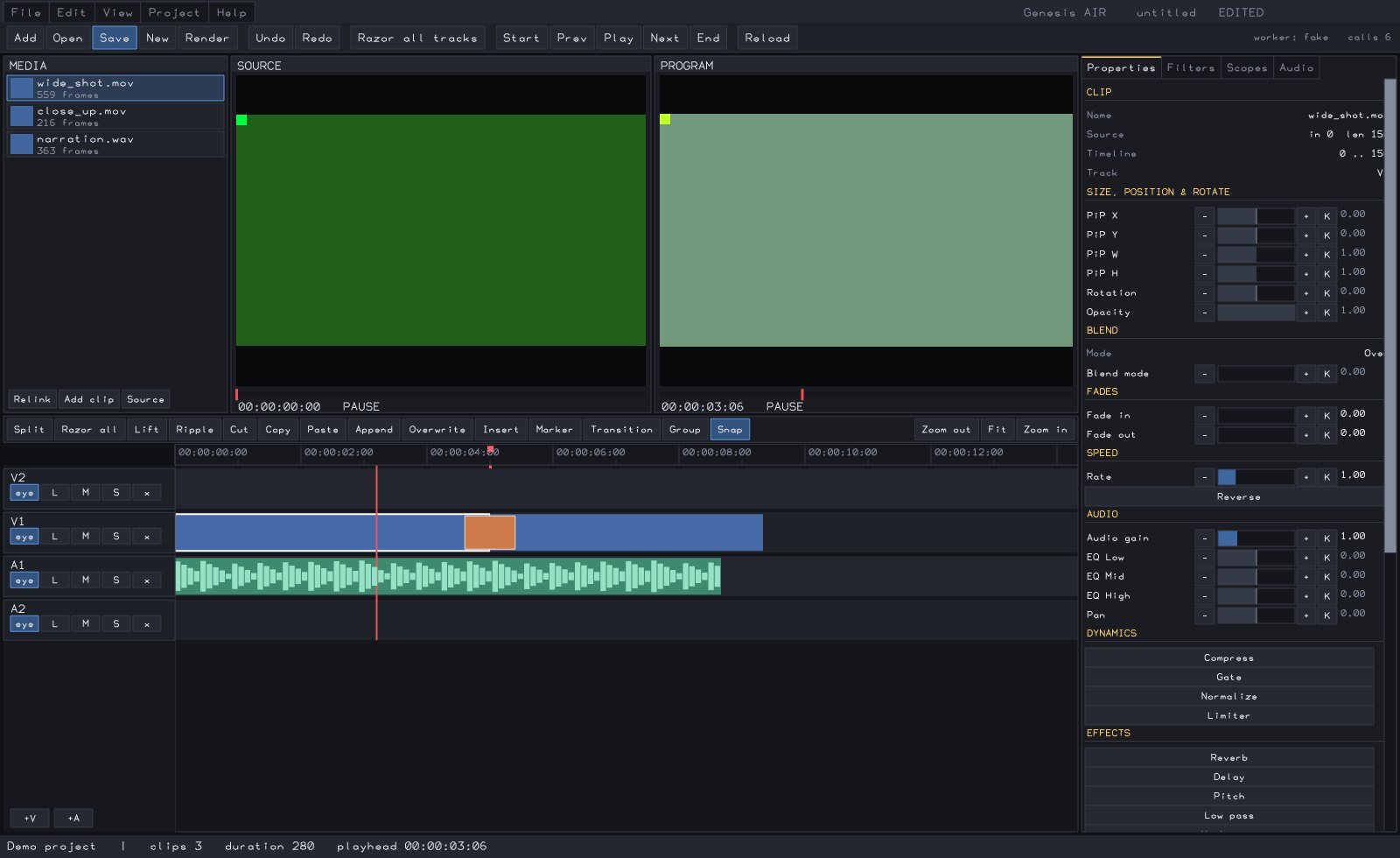
Genesis AIR: a full video editor, written in AIR.
A desktop application of real complexity: source and program monitors, a multi-track timeline, keyframed properties, 51 video and audio filters, scopes, a mixer and MP4 export.
- About 8,000 lines of application code
- All editing logic comes from AIR's reusable editor toolkit
- One document holds every project fact, with undo for every change
Where teams use AIR.
Internal tools, built by agents, safe to run
Back-office services, data pipelines and admin tools that your developers and their agents produce quickly, reviewed by signature and shipped as single binaries.
Desktop applications
Native apps with galleries, dialogs, drag and drop and media playback, like AIR Lens and Genesis AIR.
HTTP services
Servers and clients with durable storage, telemetry and restart-safe state.
On-prem generative media
Image and video generation on your own GPUs, for teams that can't send content to a cloud API.
Data and file processing
Parallel hashing, streaming records and checked JSON, with typed structured concurrency.
Start with one internal tool.
A pilot takes a real tool your team needs and delivers it in AIR, with its capability matrix and build records, so you can judge the approach on your own work.
- Pick the toolA service, CLI or desktop app with a clear owner and real users, ideally something you would otherwise build in-house.
- Build it with your agentsYour developers work with their usual coding agents, with AIR's compiler as the authority on what's correct.
- Review the evidenceSecurity reads the capability matrix, operations deploys one binary, and everyone gets the build records.
- DecideKeep the tool, expand to the next one, or stop. Everything you built stays yours.
Questions IT teams ask.
What platforms does AIR run on?
Linux x86-64 today. The compiler is C++20 and C11, built with CMake and Ninja using GCC 13+ or Clang 16+. Applications compile to native executables with no runtime to install.
Are we locked in?
AIR compiles through readable C11, and your source stays plain text in your own repository. Build reports, diagnostics and schemas are JSON, so your existing CI and review tools can read them.
Do we need GPUs?
No. The GPU provider is optional, and ordinary applications never link it. GPUs are only needed if you want to run AI models.
How does AIR work with the coding agents we already use?
Agents call the compiler for structured diagnostics, capability queries, project context and verified repairs. AIR's agent policy is model-neutral and works alongside Codex, OpenCode and other process-based agents.
How mature is the model support?
Each model family documents its own status, with the gates it passed, measured results and what remains open. Models marked in progress are not yet complete.